Posts

Showing posts with the label OSB

Dynamic Routing in OSB

Image
In this post we will see how to use OSB dynamic routing feature to Route Request to different proxy/business service at run time.  To demonstrate how Dynamic Routing works, we will first create two proxy service with Mocked response indicating which proxy service got called. We will have customer creation service, which creates the customer either in CRMOD or OCH based on the parameter passed in request. There will be 3 proxy services: 1.      OCH proxy service : a.       URI : /proxy/ ochCreateCustomer This proxy will return the mocked response i.e. “customer created in OCH” 2.      CRMOD proxy service: a.       URI : /proxy/ crmodCreateCustomer This proxy will return the mocked response i.e. “customer created in CRMOD” 3.      Create Customer Orchestration service: a.       URI: /proxy/ createCustomer This p...

Connect OSB (Oracle Service Bus) to Oracle Database using Weblogic Datasource

Image
In this post I will try to explain how to connect OSB to Oracle Database with out using DB adapter. With Weblogic datasource we can directly execute the SQL select queries. We will first create weblogic datasource. Below are the steps to create Weblogic DataSource: Login into Weblogic console. eg.  http://localhost:7777/console Go to Services->Data Sources Click on   new generic datasources Give Data source name, JNDI name, Database Type. 4. Click next 5. Select Oracle Driver and click next. 6. Give database connection details ie. ServiceName, IP, Schema, Password, port. 7. Click Next, and click Test Configuration. If everything is okay then you will see " Connection test succeeded ." message. Click on Finish 8. Next Click on Data Source 'OSBDB' and click on Targets. Select admin server and click save.  You have a data source ready to use. Next, We will show how to us...

Remove Empty Attributes in XQuery

Here is how you can remove empty attributes while xQuery mapping. Consider the following input xml: Input: Case 1: <product> <code>MAX</code> </product> Expected Result: <FinalProduct ProductCode="MAX" > </FinalProduct> Case2: <product> <code/> </product> Expected Result: <FinalProduct> </FinalProduct> Thus, we don't want the attribute to be present if the mapped element is null. Please find the below snippet for the above problem: <FinalProduct>                {                        if((fn:boolean(data($product/code))))                           then attribute ProductCode                           {      ...

Solution for Error "The invocation resulted in an error: Cipher not initialized."

Image
I received this " The invocation resulted in an error: Cipher not initialized ." error while calling the external service running on SSL. Please find the below screen shot. Solution: Add the following line in setDomainEnv.cmd or setDomainEnv.sh  below  "set EXTRA_JAVA_PROPERTIES=". set EXTRA_JAVA_PROPERTIES=%EXTRA_JAVA_PROPERTIES% -Dssl.debug=true -Dweblogic.StdoutDebugEnabled=true -Dweblogic.security.SSL.verbose=true -Dweblogic.security.SSL.ignoreHostnameVerification=true -Dweblogic.ssl.AllowUnencryptedNullCipher=true -Dweblogic.security.SSL.nojce=true Thanks, Rohan 

Solution for "The invocation resulted in an error: Not Found" message in response

Image
Hi, Recently I got an error while testing my business service. Please find the below screen shot. But the service used to work properly when I test it from SOAP UI. The solution for this is to disable (by default enabled) " Use Chunked Streaming Mode " in business service. Formal definition: Use Chunked Streaming Mode Select this option if you want to use HTTP chunked transfer encoding to send messages. Note : Do not use chunked streaming with if you use the  Follow HTTP Redirects  option. Redirection and authentication cannot be handled automatically in chunked mode Thanks, Rohan

Important point regarding "OSB Publish Action "

Image
Hi, I had used OSB publish action to make  asynchronous call to the external service. While working on this, I found that, If we used OSB Publish Action to call the OSB proxy service (on Local, or on HTTP) it becomes a  synchronous call and Thread get block till we don't get the response.  OSB Publish Action work  asynchronously only when the Publish call is from Proxy service to Business Service.  For example: Consider an order proxy which make a Publish call to OSB logger Proxy and OSB Logger proxy then may call a Business Service to log the data. Here the call from Order proxy to Logger proxy is Synchronous, even though we expect it to be Asynchronous. The way around:  One solution is you make a publish call from OSB Logger proxy to OSB Logger Business Service. You can used publish or a call out at Order Proxy. In this way you can have a asynchronous call to Logger Proxy. Thanks, Rohan Lopes

Calling web service hosted outside firewall i.e. Internet from Oracle Service Bus (OSB)

Image
There is often a need to call the web service that is Hosted Outside the Firewall. For eg. Lets say we want to use the "ISBNTest" web service published on xmethods.net, OSB won't be able to send the request with out setting the proxy. Following are the steps to carry out the proxy setting:- 1. Create the business service based on WSDL of external web service. 2. Create new Proxy Server . You need to select the OSB Configuration project to create the proxy server, as all the configuration setting are maintain under Configuration project. 3. Click Add Host-Port parameters.     Enter Server Host, Text Port and SSL port. 4. Click Save 5. Go back to the business service, Under HTTP transpor t click Advance Select the proxy server that you created above. 6. Now when you test your business service, it will use the proxy mention in Proxy Server and call the web service. Do let me know if you find any issue. -Rohan Lopes

Implement Parallel Split Join OSB

Image
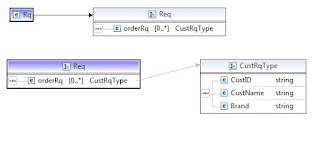
Example for implementing parallel Split Join in Oracle Service Bus ( OSB ) 11g: Consider the following is the scenario: We have a Customer Inquiry Service, which takes Cust_ID, Cust_name and Brand as an Input and return Cust_ID, Cust_name and Balance as an output. You will receive a customer list as an Input, here instead of calling " Customer Inquiry Service " sequential,  We can use Parallel Split Join In OSB to make the parallel call to " Customer Inquiry Service ". The response from all the requests will be aggregated and return back to the client. Following are the steps: I created a simple XSD that will take list of customer request and return the list of response. Request Xsd Created a simple WSDL based on the request and response element mentioned above Created a Dummy   " Customer Inquiry Service " proxy service (Customer.proxy) that will return a sample response. Base the proxy service on the WSDL created above. Will call this p...